
What the signer receives
So you can tell somebody on the phone exactly what to look for.
An email from GetSimpleSign, with your organization’s name and logo in it, and the name of the agreement in the subject line.
A button that opens their own private link. It works only for them, only once, and stops working when the agreement is completed, cancelled, or expires.
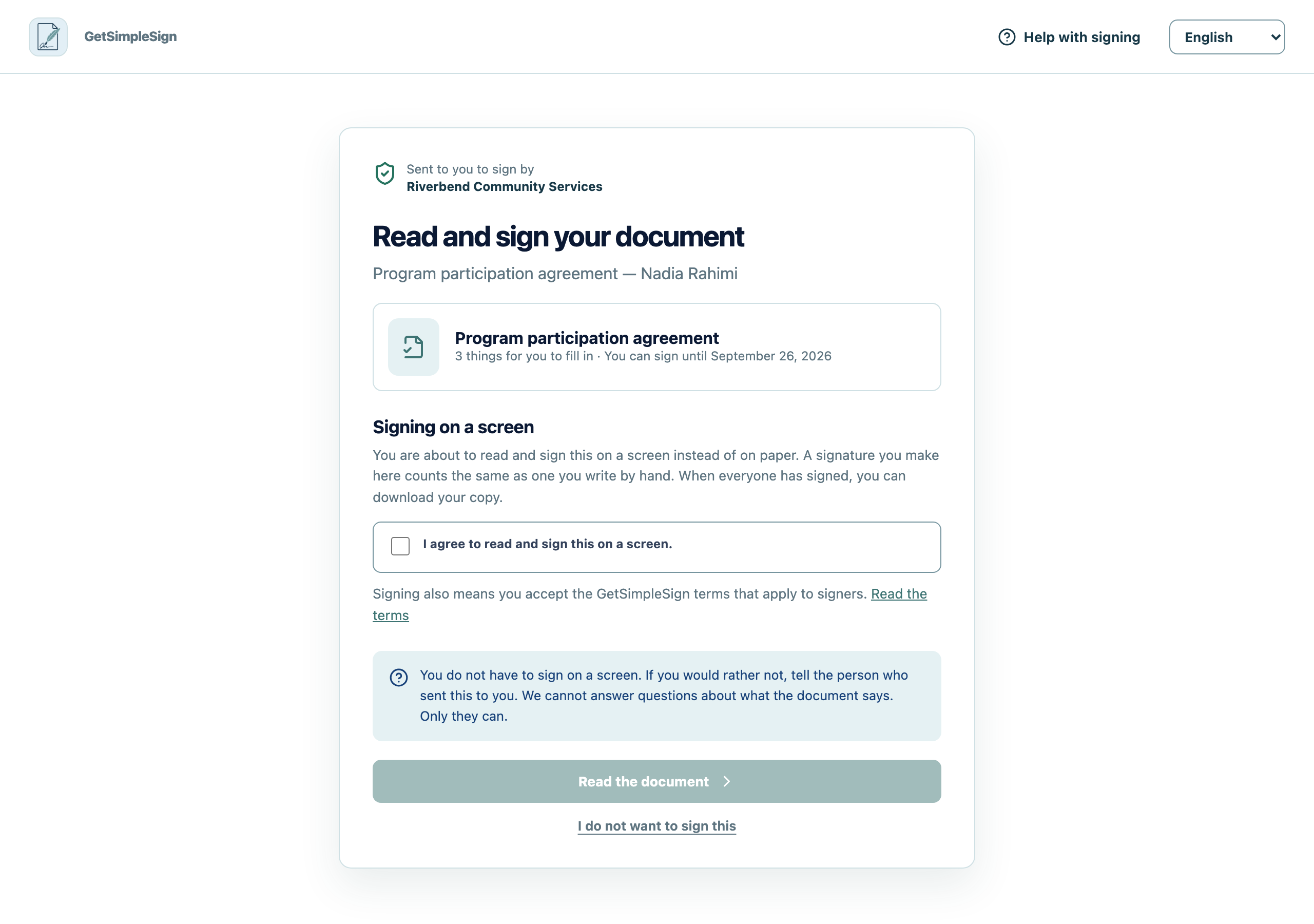
On opening it: who sent it, what it is, an explanation of signing on a screen, and the agreement to do so.
 12
12What a signer sees first: who sent the document, an explanation of signing on a screen, the agreement to do so, and a link to the terms. - 1Signing on a screen counts the same as signing on paper. You have to agree to this before the document opens.
- 2Nobody has to sign electronically. Declining tells the sender and asks nobody else.
Reminders before the link expires, if you left those on.
A completion notice when everybody has signed.
You can describe the email over the phone well enough for somebody to find it in a full inbox.
They cannot find it. Ask them to search for the name of your organization rather than for GetSimpleSign, then to look in spam.
They forwarded it to somebody else and now it does not work. A link is single-use and specific to one person. Resend it.