
In-person signing
Somebody signs on your device, across the desk, with nothing emailed.
The person in front of you. This is for the client with no email address, no phone, or no confidence using one — which is an ordinary case, not an edge case.
On the send screen, choose In person, on your device for that recipient. The email field disappears, because nothing is sent.
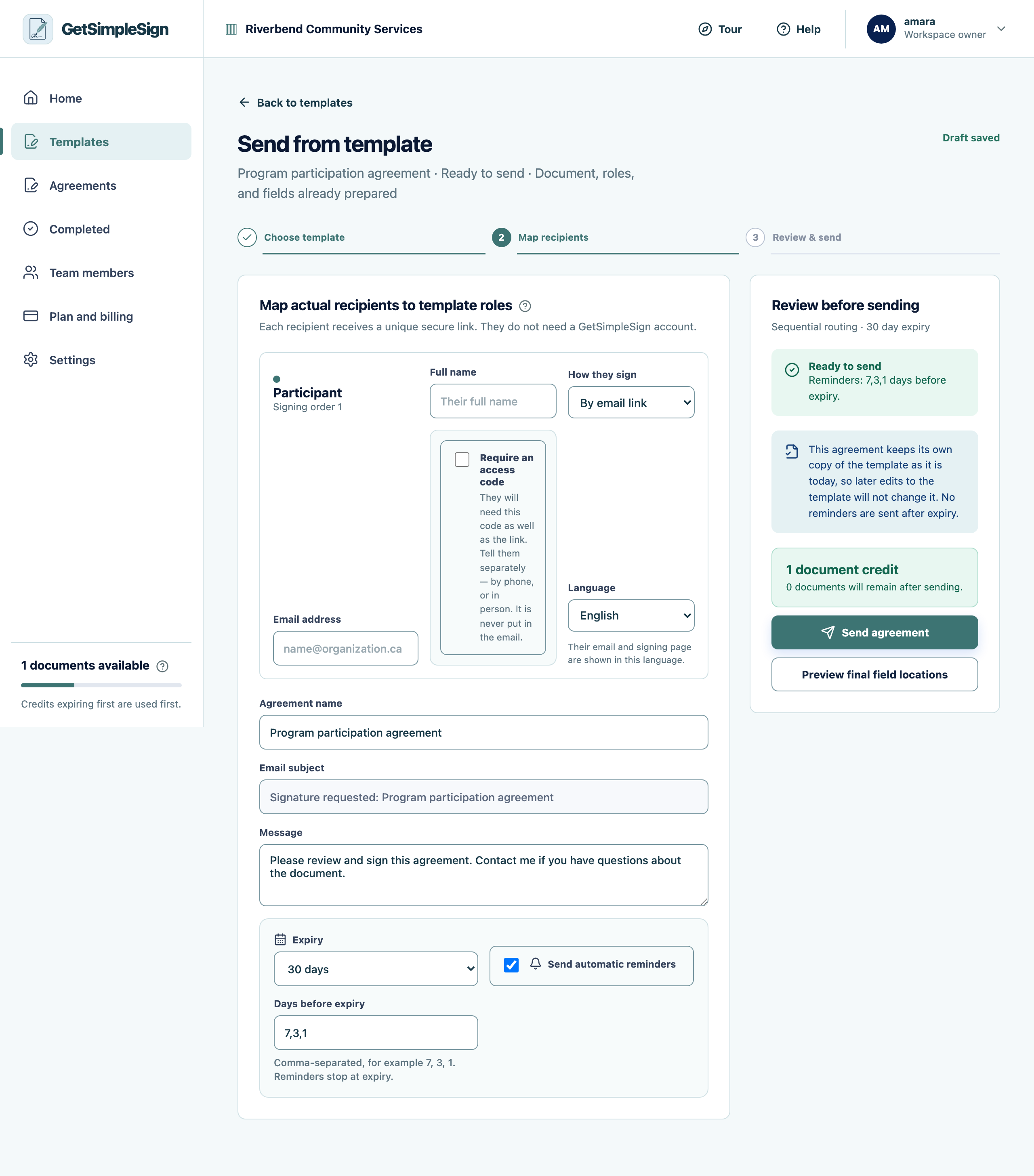 123
123The send screen, with the recipient's name and email, how they sign, the language, the option to require an access code, the agreement name, message, expiry and reminders. - 1The person who will sign. Type their name — the agreement name and greeting follow it.
- 2Require an access code when the mailbox might be shared. Tell them the code separately; it is never put in the email.
- 3How long the link works, and when reminders go out.
Send the agreement as usual.
When they are with you, open the agreement and press Hand over this device.
Your own session locks while they hold it. They cannot reach your workspace, only the document in front of them.
Let them read and sign. Then take the device back and unlock it with your password.
The completion record says the signature was made in person, names you as the person hosting it, and names anyone who helped — an interpreter, a witness, a support worker.
The hand-over expired. It lasts twenty minutes on purpose, so a device left on a desk is not still holding a live signing session an hour later. Press Hand over this device again.
You were interrupted and they went home without signing. Nothing is lost; hand over again next time.